White-label payment gateway
Your brand on the front.
Our rails underneath.
Offer payment processing to high-risk merchants under your own name. White-label payments for agencies, resellers, SaaS platforms and anyone with merchants to bring: you open a free partner account yourself, set your own fee, and we run the engine that moves the money. No setup fee, no monthly fee. You add your own markup on top of our 1%, and your share is paid on-chain to your wallet in the same settlement as every payment.
Open a partner account, freeGet the WordPress pluginRead the partner terms
Only want the API for your own store? That is free. Read this instead.
What you get.
- Your brand on the checkout. Your logo and your brand colour render on the hosted checkout page every one of your merchants' customers sees. The page is served from pay.epayvista.com and carries a small "Powered by ePayVista" line. A checkout on your own domain is not available. Your brand name comes from your sign-up form. You set your logo, colour and brand name yourself, in your partner dashboard or with the Partner API.
- Your own sign-up link. Your partner dashboard, the Partner API and the WordPress plugin all show your merchant sign-up link: https://pay.epayvista.com/portal/register?partner=<your partner code>. Before the account is created, merchants who sign up through it see "You are signing up through" your brand and the processing fee percentage, and once they confirm their email they are attached to you automatically.
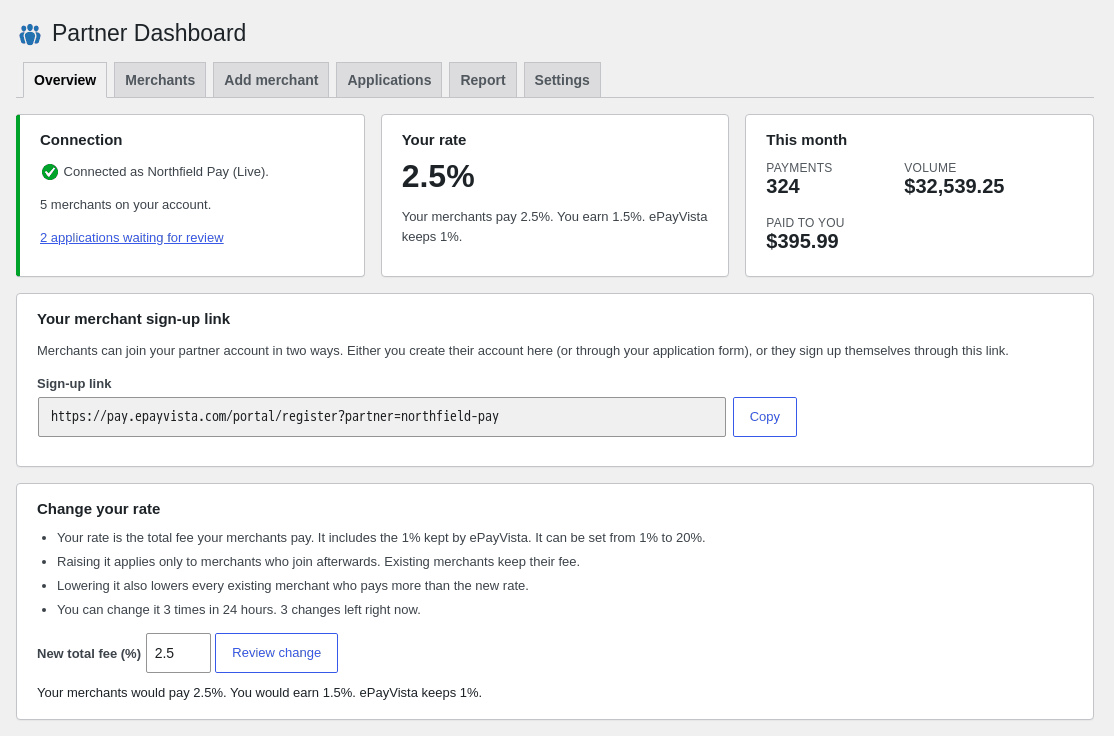
- Your share, paid with every payment. Charge your merchants our 1% plus the share you choose. You set the total rate your merchants pay, from 1% to 20%, in your partner dashboard, by API or in the WordPress plugin, and you always see the total your merchants pay. We keep 1%; your share is yours. It is sent on-chain to your payout wallet in the same settlement as each payment, exactly like the merchant's payout. Nothing is held, nothing builds up, no monthly payout, no invoice to send, no minimum.
- A partner dashboard. A login at pay.epayvista.com/portal/reseller where you set your share, see the total fee your merchants pay, copy your signup link, add merchants and create an API key. It lists your merchants with the fee each one pays, their payment count and gross volume per month, and what was paid to your wallet, with a CSV export. Scoped to your merchants only.
- A partner API. From your own systems, with a Partner-Key header: read and change your rate, list your merchants, create a merchant, read one merchant and its payments, lower a merchant's fee, close a merchant account and pull the monthly report. Partner API reference.
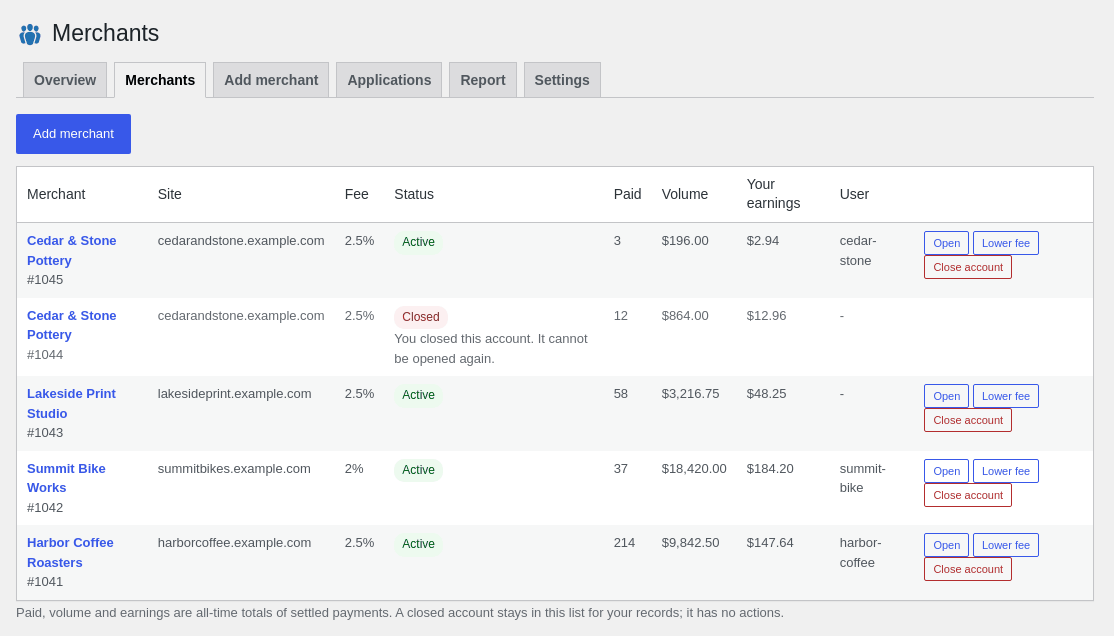
- A fee per merchant. Besides your partner rate, you can set a fee for one merchant, within the same 1% to 20%. A merchant's fee can be lowered at any time; it cannot be raised for a merchant who already has an account.
- A free WordPress plugin. Run your partner dashboard from your own WordPress admin, with a merchant application form and a merchant dashboard on your own site. See the Partner Dashboard plugin.
- Changing your rate is fair to your merchants. Raising your share applies to merchants who join from then on; merchants you already have keep the fee they signed up with. Lowering it lowers everyone above the new rate right away. The total a merchant pays can never be more than 20%.
- The same engine as everyone. Your merchants get the same API, signed webhooks and sandbox as every ePayVista merchant, and the same instant settlement to their own wallet.
- A free developer sandbox. Your engineers can build and test the whole integration on a test network before anything goes live. Open the sandbox.
- Signed webhooks on every payment. Payment and settlement events delivered straight into your platform, verified with HMAC signatures.
- Funds never sit with us. Every payment settles on-chain as it is paid, direct to each merchant's own wallet, with a transaction hash they can verify. No balances, no payout schedule, no reserves. That answers the first question their finance people ask.
- Card and crypto at checkout. Their customers pay by card, Apple Pay, Google Pay or crypto wallet. Card payments are run by independent licensed card providers, who alone decide approvals, declines, identity checks, countries and minimums. Merchants get paid in stablecoins.
Two ways merchants join you.
- They sign up through your link. Your merchant sign-up link (https://pay.epayvista.com/portal/register?partner=<your partner code>) is shown in your partner dashboard, by the Partner API and in the WordPress plugin. Merchants who sign up through it see your brand and your fee first, before the account is created, and are attached to you once they confirm their email. The partner code is the last part of that link. It is not your Partner API key, which stays secret.
- You create the account for them. From your partner dashboard, the Partner API or the WordPress plugin, you enter the merchant's details, payout wallet and fee, and the account is created on your partner account. You need the merchant's agreement and correct details first. You tell the merchant about their account; we do not email them.
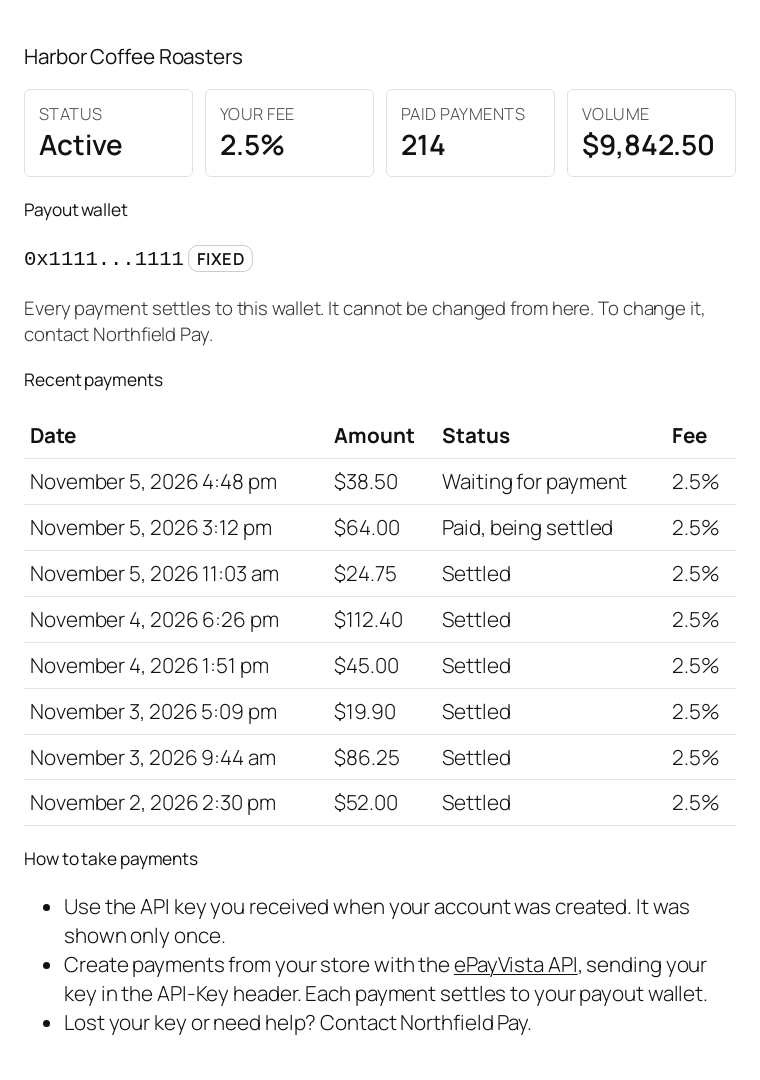
The payout wallet of an account you create is fixed. It is set when the account is created. To use another wallet, close the account and create a new one with the new wallet. Closing is permanent: a closed account cannot be opened again. A new account for a store whose account you closed cannot have a higher fee than the closed account had.
How these merchants take payments. Merchants whose account you create take payments through the ePayVista API with their own API key. The separate ePayVista Payments plugin for WooCommerce connects a store as a standard ePayVista merchant account at 1%. To join you, the merchant enters your partner code when connecting the store and agrees to the fee it shows, or first signs up through your link and connects with the same email and payout wallet. Otherwise it is a standard account, not linked to you.
WordPress partner plugin
Run your partner program from WordPress.
The free ePayVista Partner Dashboard plugin puts your partner dashboard inside your own WordPress admin, and gives your merchants an application form and a dashboard on your own site, under your brand.
- Your rate and your merchants in wp-admin. Set the total rate your merchants pay, see your merchants, add a merchant and lower a merchant's fee.
- Merchant applications. A shortcode puts a merchant application form on any page of your site, and you review the applications in wp-admin. By default each application waits for your approval; you can switch to automatic approval.
- A dashboard for each merchant. A second shortcode gives your merchants their own dashboard on your site.
- Your sign-up link on any page. A third shortcode shows your merchant sign-up link wherever you put it.
- Monthly report with CSV. See the month's payments and your share, and download it as a CSV file.
- Sandbox mode. Build and test the whole flow on the sandbox before you go live.
- Your Partner-Key stays on your server. It is never sent to your visitors' browsers.
Download the partner plugin (.zip)Open a partner account
Free. Version 1.0.1, for WordPress 6.0 or newer and PHP 7.4 or newer, with a free partner account. It runs on any WordPress site and does not need WooCommerce. More about the Partner Dashboard plugin.
Taking payments on your own store instead? That is a different plugin, ePayVista Payments, on the download page. It connects a WooCommerce store as a standard ePayVista merchant account at 1%. A merchant working with a partner can enter the partner's code when connecting and agree to the fee it shows; the store then joins that partner.
What it costs.
| White-Label Partner | |
|---|---|
| Setup | $0 Open a partner account |
| Monthly | $0 |
| Our cut of volume | Our standard 1%. Your markup on top is yours. |
| Your rate | Set and changed by you, 1% to 20% in total, in the dashboard, by API or in the WordPress plugin |
| Fee per merchant | Optional, within 1% to 20%. Can be lowered, never raised for an existing merchant |
| Partner payout | With every payment, on-chain, to your wallet |
| Branding | Your brand name, logo and colour on checkout. You set them yourself |
| WordPress plugin | Free |
| Merchants | No limit on the total. Adding them yourself is capped per partner: 2 an hour and 6 in 24 hours while new, 5 an hour and 25 in 24 hours after your first paid payment or 7 days. Sign-ups through your link are not capped this way. |
| Checkout domain | pay.epayvista.com |
| Infrastructure | Ours |
| Contract | None. Standard Terms for everyone. |
| Best for | Agencies, CRMs, platforms, consultants and anyone with merchants to bring |
No setup fee, no monthly fee, no minimum volume. You set the rate your merchants pay; we keep 1% and the difference is yours. The full fee is taken on-chain with each payment, and your share goes to your payout wallet in that same settlement. Network fees are taken out of the payment at settlement.
Open a partner account.
It is free and self-serve. Sign up with your email, a password, your brand name, the payout wallet for your partner earnings and the total rate your merchants will pay, then confirm your email. You land in your partner dashboard with your merchant signup link.
Questions first? Email contact@epayvista.com.
What happens after you sign up.
There is no application and no call. This is the whole sequence, with nothing left out.
- You open your account. Email, password, brand name, the payout wallet for your partner earnings and the total rate your merchants pay, then you confirm your email. The wallet is needed from the start, because your share is paid with the first payment.
- You are in your partner dashboard. At pay.epayvista.com/portal/reseller you change your share, copy your merchant sign-up link (pay.epayvista.com/portal/register?partner=<your partner code>), add merchants and create your API key for the Partner API or the WordPress plugin. The API reference and sandbox are at pay.epayvista.com/sandbox.
- Merchants join you. They sign up through your link, or you create their account yourself (see the two ways merchants join). Their checkouts carry your brand name, and your logo and colour once you have set them. They are paid to their own wallet like every merchant.
- Your share arrives with every payment. From the first payment, your share is sent on-chain to your wallet in the same settlement that pays the merchant. Each payment pays our fee, then your share, then the merchant, in that order. If a transfer does not go through, the rest waits on the payment's deposit address and is retried; no share goes to anyone else.
Questions go to contact@epayvista.com. Support is by email only.
The math your merchants make easy.
A partner whose merchants process $500,000 a month at 1.5% collects $7,500. We keep our 1%, which is $5,000. The other $2,500 is yours, and it arrives payment by payment as your merchants are paid, not at the end of the month. No setup fee and no monthly fee, on infrastructure you did not have to build, secure or babysit.
The API reference and the sandbox are public and free - you do not have to commit to anything, or sign anything, to read them or build against them.
Want to see what your merchants' customers would see? Try a demo checkout with test funds. No account and no money needed.
Same terms for everyone.
The partner program runs under our public Terms of Service, the same for every merchant and every partner. We do not negotiate or sign individual agreements, contracts, NDAs, rate deals or exclusivity arrangements, and there is no exclusivity on either side. Joining means accepting the Terms, and you can stop at any time.
Everything is self-serve and handled by email at contact@epayvista.com. No calls, no phone or chat support, no custom arrangements.
FAQ
Partner questions.
How do I become a white-label partner?
What fee can I charge my merchants?
Can I change a merchant's fee later?
Is there a WordPress plugin for partners?
Can a merchant I create change its payout wallet?
More answers on the ePayVista FAQ, and the full rules in the partner program terms.
API access
Just need the API for your own store?
Then you do not need White-Label. Direct REST API and signed webhooks are included with every account at no charge. White-Label is for running your own processor: your brand, your merchants, and your own fee on top of our 1%.